

1. What happens to my existing Campaigns, Missions, and Groups created in previous years?
Any Campaigns, Missions, and Groups that are not related to EPIC initiatives will be removed. If you wish to retain any information, please ensure that you save or export or screenshot your data before the deadlines below.
Groups and Missions
- All Groups and missions not related to EPIC initiatives will be removed and deleted after 31 March 2026.
Fundraising Campaigns
- All active and inactive fundraising campaigns that are not initiated by EPIC or not related to EPIC initiatives will end by 31 March 2026.
- If your campaign is scheduled to end after this date, donations will cease to be accepted after 31 March 2026.
Fund Withdrawal & Data Access
- You will have a grace period until 30 April 2026 to withdraw any remaining funds.
- After 30 April 2026, you will no longer be able to access or view your campaigns. Please ensure that you save or export any necessary data before this date
2. Will my account be affected by this transition?
No. Your account will not be affected if you are not part of any Campaigns, Missions, or Groups.
If you have participated in any of these, any achievements associated with Campaigns, Missions, or Groups not related to EPIC initiatives will be removed and will no longer appear on your profile.
3. How can I save or download my data from Campaigns, Missions and Groups (If any)
Campaigns, Missions, and Groups
Saving As HTML:
You can save your Campaigns, Missions, and Groups data by taking a screenshot of the page or saving it as HTML.
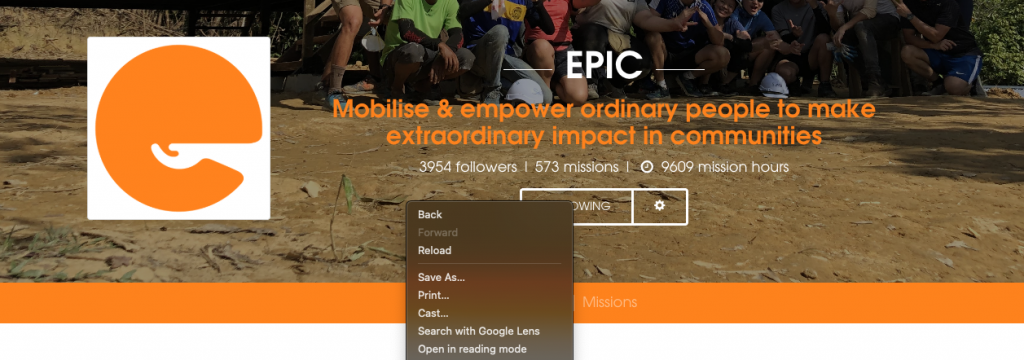
This allows you to save a copy of your group’s webpage.
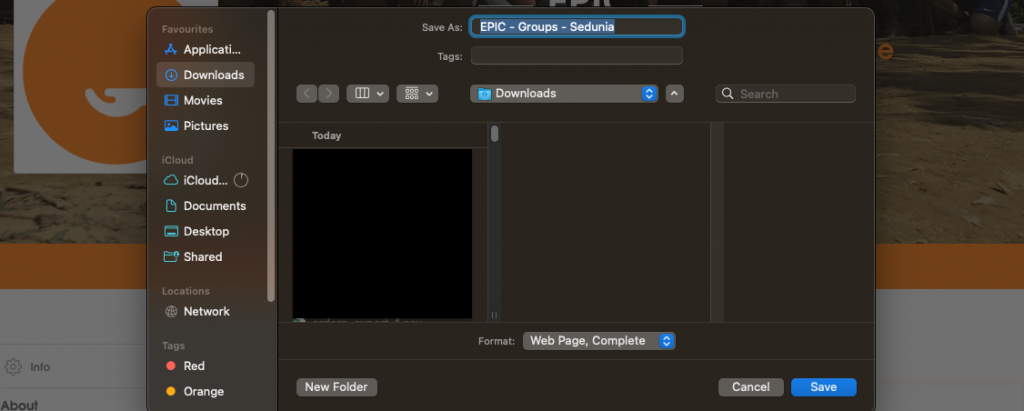
To do so, click the right mouse button and select Save as HTML or whichever fits you.
Save your list of donors
As for your Fundraising campaigns, you are able to save your donors name and the amount they have donated. Head to your campaign bottom right, click “view all”.

This will bring you to a list of donors who has contributed to your campaign

You can then export or copy or print as you wish.